






























You’re at a café, laptop open, about to log into your bank on their free Wi-Fi. Or you’re trying to watch a show that’s blocked in your country. Or your work laptop refuses to connect to anything unless you fire up that company-mandated app first. These moments all have something in common — they’re where the question “Proxy vs VPN” stops being abstract and starts mattering. Both hide your IP. Both can get you around geo-blocks. The catch is that one of them just reroutes your traffic, while the other encrypts it — and which of those matters more depends entirely on what you’re trying to protect. Here’s how they really compare, and which one is worth trusting with what.
What is a proxy server and how does it work?
A proxy server is essentially a middleman. Instead of your browser or app talking directly to the website you’re visiting, it sends the request to a proxy first. The proxy forwards that request to the destination, receives the response, and passes it back to you. The website sees the proxy’s IP, not yours. That’s the part most people are paying for when they use one.
The flow is simple:
- Your browser sends a request to the proxy
- The proxy forwards it to the target website
- The website responds to the proxy
- The proxy relays that response back to your device
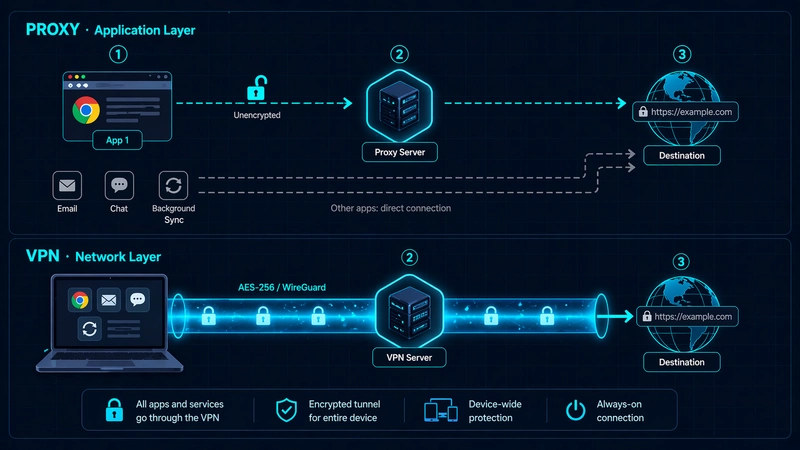
The thing most people miss: proxies operate at the application layer. Only the app or browser you specifically configured to use the proxy is routed through it. Everything else on your device keeps using your regular connection. Set up a proxy in Chrome, and your Firefox traffic, your email client, and your background apps all still expose your real IP.
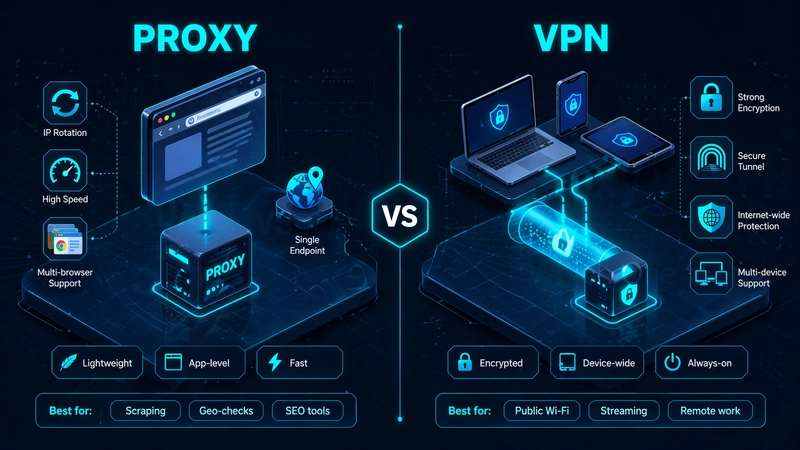
And here’s the part that matters most: most proxies don’t encrypt your traffic. They reroute it without wrapping it in a protective layer. Whoever’s running the proxy (or anyone sitting between you and it) can potentially see what you’re doing. That’s the quiet catch behind the cheap price tag. A proxy redirects your traffic. The shield isn’t part of the package.
Common proxy types you’ll run into
You don’t need to memorize a taxonomy, but a few names come up often. HTTP and HTTPS proxies handle web traffic; the HTTPS version adds a layer of encryption between you and the proxy itself. SOCKS5 is more flexible: it can route any kind of traffic, not just web requests. Transparent proxies are the kind you don’t even know you’re using (schools, offices, some ISPs). Residential proxies route through real home IP addresses and are popular for scraping and ad verification, while datacenter proxies are faster but easier for websites to flag and block.
What is a VPN and why is it built differently?
A VPN, or virtual private network, solves a similar problem with a fundamentally different approach. Instead of routing a single app’s traffic through an intermediary, it builds an encrypted tunnel between your entire device and a remote server. Everything leaving your computer goes through that tunnel: browser, apps, background processes, OS calls.
The encryption is the key part. A modern VPN wraps your traffic in AES-256 or ChaCha20 encryption before it leaves your device. Even if someone intercepts the data mid-flight (your ISP, a hacker on public Wi-Fi, a government sniffing the backbone), what they see is scrambled gibberish. The VPN server decrypts it, forwards it to the destination, and sends the response back through the same tunnel.
This happens at the network layer, which is the technical reason VPNs cover your whole device automatically. You don’t configure individual apps. You turn the VPN on, and your system-wide traffic is protected.
The mechanics rely on something called a tunneling protocol. WireGuard is the current favorite — lean, fast, modern cryptography. OpenVPN has been the workhorse for years and is battle-tested. IKEv2 is popular on mobile because it handles network switching gracefully when you move between Wi-Fi and cellular. If you want to dig into the specifics of how these protocols build the tunnel, our VPN Guide breaks it down further.
Encryption by default, system-wide coverage, operating at the network layer. That’s what separates a VPN from a proxy at the core: the tunnel wraps everything it carries.
Where do proxies and VPNs actually differ?
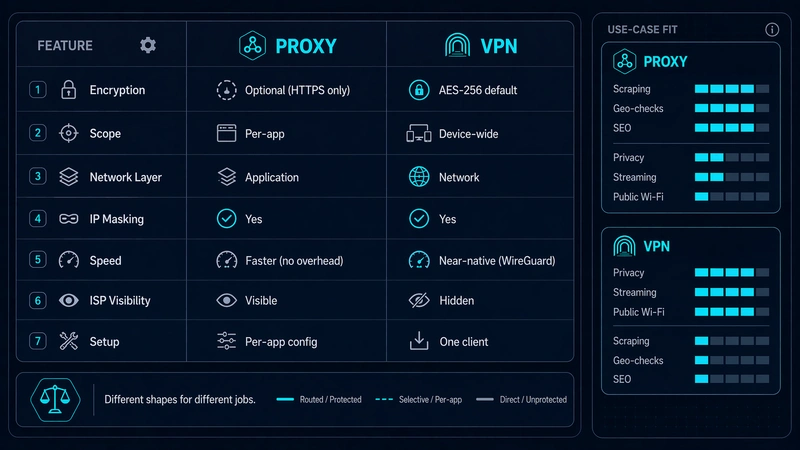
On the surface they look like cousins: both hide your IP, both let you appear somewhere you’re not. Under the hood, they’re built for different jobs. The quick side-by-side:
| Feature | Proxy | VPN |
|---|---|---|
| Encryption | Usually none (HTTPS proxy partial) | Full, by default |
| Scope | Single app or browser | Entire device |
| Network layer | Application layer | Network layer |
| IP masking | Yes | Yes |
| Speed | Generally faster | Slight overhead |
| Privacy from ISP | No | Yes |
| Setup | Per-app configuration | One client, full coverage |
That table is the short version. The proxy vs VPN differences really show up when you break them down dimension by dimension.
Encryption and data protection
This is the biggest gap between them. A standard proxy passes your traffic along without encrypting it. An HTTPS proxy adds some protection, but only for the leg between you and the proxy, and only for web traffic. A VPN encrypts everything, end to end, regardless of what kind of traffic it is. If your goal is to protect what you’re doing from anyone watching the network, encryption isn’t a nice-to-have. It’s the whole point.
Privacy and anonymity
Both hide your IP. But a VPN also hides what you’re doing with that IP. A proxy says “this user is visiting example.com” to anyone capable of inspecting the connection. A VPN just says “there’s encrypted traffic happening.” That’s a big difference when it comes to your ISP, a network admin, or someone running a packet sniffer on the Wi-Fi you’re connected to. A proper VPN also protects against DNS leaks and WebRTC leaks (small technical holes where your real identity can squeak out even when an IP is technically masked).
Speed and performance
Proxies usually feel faster because there’s no encryption overhead. Your data isn’t being scrambled and unscrambled at both ends. VPNs trade a little speed for security, but the gap has shrunk a lot. WireGuard in particular is so efficient that on a decent connection you barely notice it’s on. For most day-to-day use, speed isn’t the deciding factor anymore.
Scope of protection — app-level vs system-wide
Most comparisons skip this one, which is strange — in practice, it’s the difference that matters most. A proxy protects what you explicitly tell it to protect. A VPN protects everything. If you configure a proxy in your browser but forget about the app that quietly pings a server in the background, that app still leaks your real IP. With a VPN, the tunnel catches everything the moment it leaves the device. No configuration sprawl, no forgotten apps.
Compatibility across devices and apps
Proxies are per-app, which means setting one up across five apps means configuring five apps. Some don’t even support proxy settings. VPNs install as a system service or client, cover the whole device, and handle app compatibility for you. If you have multiple devices (phone, laptop, tablet), VPN providers usually let you cover them all on one subscription.
Typical use and setup effort
Proxies are lightweight. Paste in an IP and port, maybe credentials, and you’re done. Good for one-off tasks like web scraping, geo-checking a single page, or bouncing a single app’s traffic. VPNs require installing a client, but once it’s installed, turning it on is a button. For ongoing everyday privacy, that one-time setup pays off quickly.
Which one actually protects you, and when?
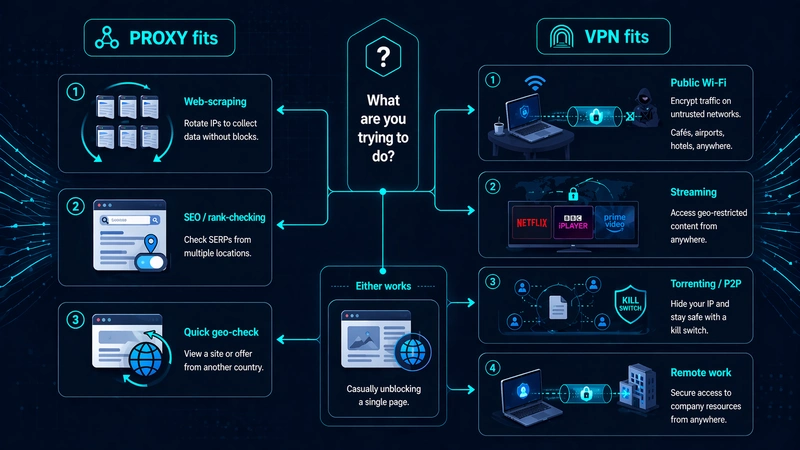
Here’s the practical question: given what you actually do online, which tool fits? The honest answer depends on your situation. A rundown of the common ones:
Using public Wi-Fi at a café, airport, or hotel. This is VPN territory, without question. Public networks are where man-in-the-middle attacks actually happen. Someone on the same network watching your traffic, or running a fake hotspot that mimics the real one. A VPN’s encryption makes that attack useless. A proxy without encryption leaves you just as exposed as you were before.
Casually unblocking a region-locked page. Either works. If you just want to peek at a site that’s geo-blocked and don’t care about privacy, a proxy is lighter. Configure it in the browser, do the thing, move on.
Streaming region-locked content on Netflix, BBC iPlayer, or similar. A VPN usually wins here because streaming services are aggressive about detecting and blocking datacenter proxy IPs. If speed matters more to you than privacy, say you just want to watch 4K without buffering, it’s worth weighing Smart DNS vs a VPN before you commit. Smart DNS trades encryption for raw speed.
Torrenting or any P2P. VPN only, ideally one with a kill switch. A proxy can mask your IP from the swarm, but without encryption your ISP can still see what you’re doing, and torrenting traffic is pretty easy to identify on the wire.
Hiding your activity from your ISP. VPN only. Your ISP sees every DNS query and every destination you connect to unless you’re tunneling that traffic. Proxies don’t hide this. They just change where one app’s traffic ends up.
Web scraping, SEO tools, or ad verification. Proxy, often at scale. You want rotating IPs, speed, and the ability to plug proxies into specific tools. A VPN routes all your device traffic through one IP, which is exactly the wrong shape for these jobs.
Remote work with sensitive data. VPN, usually a corporate one, often mandatory. Work-from-anywhere security assumes your connection to company resources is always encrypted.
If you picture the question as “do I need encryption, or do I just need to redirect one app?” — the answer usually lands clearly on one side.
Can you (or should you) use a proxy and a VPN together?
Technically, yes. You can run a VPN on your device and configure a specific app to send its traffic through a proxy that sits inside the VPN tunnel. The path becomes: app → proxy → VPN tunnel → internet. This is a real setup some people use.
When it’s worth doing: you’re a researcher or journalist layering identities, you’re a scraper who wants an extra rotating IP layer on top of VPN-level privacy, or you’re trying to route one specific app through a different exit point than the rest of your VPN traffic.
When it’s overkill: most of the time. You add complexity, usually lose speed, and frequently introduce new failure points. A misconfigured proxy that silently stops working but still routes traffic, for example. For the vast majority of everyday use, a well-chosen VPN alone covers the ground you’re trying to cover. Stacking doesn’t multiply protection; it just multiplies things that can break.
If you’re not sure why you’d want both, you probably don’t need both.
How do you pick a VPN that actually delivers on protection?
Once you’ve landed on a VPN as the right tool, the next question is which one to trust. Marketing pages all sound the same. Here’s what actually matters when you compare them.
What a no-logs policy should really mean
Every VPN says it’s “no-logs.” Most of them are lying by omission. A no-logs claim is only worth what backs it up: an independent audit by a reputable firm, ideally repeated annually. Jurisdiction matters too. A VPN headquartered in a country with strong privacy laws and no mandatory data retention is a harder legal target than one based in a 14 Eyes country. Some providers publish warrant canaries, signed statements that disappear if they’ve been compelled to hand over user data. None of this is foolproof, but together these signals mean a lot more than the words “no logs” printed on a homepage.
Features that matter for daily protection
A kill switch cuts your internet if the VPN connection drops, so your real IP doesn’t leak during a reconnect. DNS leak protection makes sure your DNS queries go through the tunnel, not your ISP’s servers. Split tunneling lets you route some apps through the VPN and others outside it — useful when a bank app doesn’t like foreign IPs. And support for WireGuard is basically table stakes at this point. If a provider is still pushing only OpenVPN in 2026, that’s a signal about how much they invest in the product.
Free vs paid — where the trade-off really sits
Free VPNs aren’t free. They’re paid for by showing you ads, throttling your speed, capping your data, or, in the worst cases, selling your browsing data to make money. There are a few reputable best free vpns with honest freemium models where the free tier is a limited taste of the paid service, and those can be fine for light use. But if you’re relying on a VPN for real protection, paid is where the actual product lives.
A shortlist worth comparing
You don’t need to audit the whole market yourself. A handful of providers consistently deliver on audits, feature depth, and speed. Our VPN Select guide keeps a running comparison across the options worth considering, updated as providers shift.
Proxy vs VPN: quick answers to common questions
Is a VPN the same as a proxy server?
No. Both hide your IP, but a VPN encrypts all your device’s traffic and covers your whole system, while a proxy only reroutes traffic from a specific app or browser and usually doesn’t encrypt anything.
Do you still need a proxy if you already have a VPN?
For most people, no. A VPN covers what a proxy does, plus encryption, plus device-wide scope. The exceptions are specialized use cases: scraping at scale, routing specific apps through different exit points, testing geo-behavior of specific sites. In those, a proxy is the better-shaped tool for the job.
Are VPNs always slower than proxies?
Not always. Proxies skip encryption, which gives them a speed edge on paper. But modern VPN protocols like WireGuard are efficient enough that the difference is often imperceptible for everyday use. Server distance, network congestion, and your ISP usually matter more than the protocol itself.
Can free proxies or free VPNs be trusted?
Most free proxies, especially public ones, should be treated as hostile. You have no idea who’s running them or what they’re doing with your traffic. Free VPNs are more varied. Reputable paid providers often offer limited free tiers that are trustworthy, while standalone free VPN apps often monetize in ways that defeat the purpose of using one in the first place.
How can you tell if your traffic is actually being protected?
Run a leak test while the VPN is connected. Sites like dnsleaktest.com and ipleak.net show your visible IP, DNS servers, and WebRTC address. If any of those reveal your real location or your ISP’s DNS, something in your setup is leaking. A properly configured VPN will show the VPN server’s IP, the VPN provider’s DNS, and nothing that traces back to you.


Leave a comment