






























Imagine a journalist in a country where the ISP logs every connection and sends those logs to whoever asks nicely. A single VPN hides the destination from the ISP, sure. But what if the VPN provider itself gets a legal request? Or what if someone’s sitting on the wire capable of correlating traffic entering the VPN server with traffic leaving it? That’s the kind of threat model where a single tunnel starts to feel thin, and where Double VPN enters the conversation. It routes your traffic through two VPN servers instead of one, wrapping it in two layers of encryption and splitting visibility across two jurisdictions. Whether that second hop is meaningful protection or security theater dressed up as a feature depends entirely on who you are and what you’re protecting against. Here’s how it works, what it actually neutralizes, and who genuinely needs it.
What exactly is a Double VPN, and how does it work under the hood?
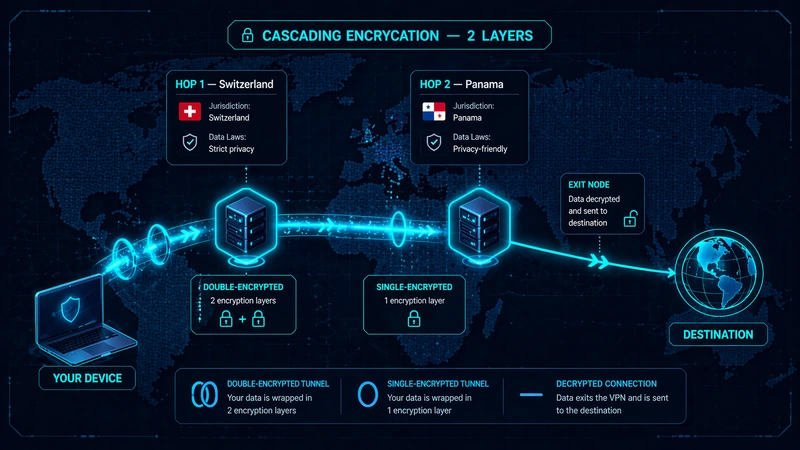
A Double VPN, sometimes called multi-hop VPN, routes your traffic through two VPN servers in sequence before it reaches the destination. Your device encrypts the traffic twice, once for each server in the chain. The first server decrypts the outer layer and forwards the still-encrypted traffic to the second server, which decrypts the inner layer and sends it out to the web.
The important detail: the first server never sees your traffic’s final destination, and the second server never sees your real IP. Neither server has the full picture. This is what security people call cascading encryption, and it’s the structural reason Double VPN offers something a single tunnel can’t.
The two servers typically sit in different countries, which is where real-world privacy comes from. If hop 1 is in Switzerland and hop 2 is in Panama, a subpoena targeting one server only reveals half the path. A government demanding logs from the Swiss server sees encrypted traffic entering and encrypted traffic leaving toward Panama, not where it ultimately went. Privacy here isn’t just about stacking encryption math. It’s about splitting the chain across legal jurisdictions.
If the basics of how a single VPN tunnel works aren’t solid yet, our VPN Guide covers that ground first. The rest of this piece assumes you’re comfortable with how a normal tunnel behaves.
The path your traffic takes, step by step
Say you’re in Berlin, hop 1 is in Switzerland, hop 2 is in Panama, and you’re loading a site hosted in Singapore. The sequence looks like this:
- Your device encrypts the request twice: inner layer for the Panama server, outer layer for the Swiss server
- The encrypted packet leaves Berlin and reaches the Swiss server
- The Swiss server peels off the outer layer and forwards the still-encrypted payload to Panama
- The Panama server peels off the inner layer and sends the real request to Singapore
- The response comes back along the same chain in reverse, getting re-encrypted at each hop
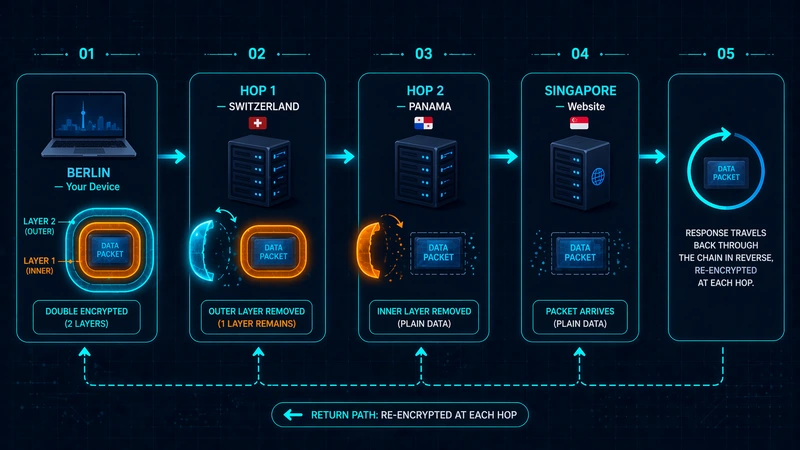
From the outside, someone watching your ISP sees encrypted traffic heading to Switzerland. Someone watching Singapore sees traffic arriving from Panama. No single observer sees both ends connected.
What does Double VPN actually protect against that a single VPN doesn’t?
A lot of marketing around Double VPN leans on vague phrases like “enhanced privacy” and “extra encryption.” Those aren’t really answers. The better way to evaluate it is by mapping the second hop to specific attack vectors it neutralizes.
Provider compromise or log subpoena. If hop 1’s logs get seized or the server gets compromised, the attacker sees encrypted traffic leaving toward hop 2. They don’t see your destination. A single-tunnel setup puts all the visibility in one place. If that one provider is compromised, the chain is broken entirely.
Traffic correlation attacks. This is the attack where an observer watches traffic entering a VPN server and traffic leaving it, then matches the timing and size patterns to link the two. On a single tunnel, this attack is well-studied and doable for well-resourced adversaries. On a multi-hop setup, correlation has to span two servers in two jurisdictions, which is significantly harder.
Jurisdictional exposure. No single legal system has full visibility. If hop 1 is in a country with strong privacy laws and hop 2 is in a different one, a single legal request can only reach half the chain. This matters less for casual browsing and a lot more for people whose adversary is a state actor.
ISP-level profiling. Your ISP sees that you’re connecting to an IP in Switzerland. That’s it. They don’t see that Switzerland is just a waypoint to Panama, and they definitely don’t see the real destination. Single-tunnel VPNs protect against this too, but Double VPN adds a layer that makes the profile even thinner.
Protocol-layer fingerprinting. Some Double VPN implementations use different encryption protocols or parameters at each hop, making it harder to fingerprint the traffic as belonging to a known VPN service.
These aren’t abstract benefits. Each one maps to a real category of adversary, and the honest answer is that most everyday users don’t face these adversaries. That’s what the later section on who needs this is for.
What’s the real cost of running traffic through two VPN servers?
The second hop isn’t free. Here’s what you’re paying for the extra layer.
Speed. Double VPN is noticeably slower than a single tunnel, and the exact drop varies a lot. Server pair distance, protocol, and your baseline connection all factor in. Some pairs add modest latency; others can cut throughput dramatically. If your use case involves large file transfers, 4K streaming, or real-time work, test the specific hop pair before committing to it for long sessions.
Latency compounding. Each hop adds round-trip milliseconds. Even if each server individually feels fast, the sum matters for anything interactive: video calls, gaming, remote desktop sessions. For passive browsing, you probably won’t notice. For anything time-sensitive, you will.
Server pair limits. Providers generally offer a fixed set of pre-configured server pairs rather than letting you pick any two servers arbitrarily. You might get ten or fifteen pairings instead of hundreds of single-server options. If you need a specific exit country, the pair list may not include it.
Feature incompatibility. Split tunneling, the feature that lets you route some apps through the VPN and others outside it, usually doesn’t work with Double VPN. Some protocols (like WireGuard on certain providers) either don’t support multi-hop at all or support it with caveats. You’re trading flexibility for the extra layer.
Trust consolidation. This is the caveat most marketing pages skip, and it’s the biggest one. When both hops are operated by the same provider, they’re still a single trust domain. If the provider is compromised, logs a record they shouldn’t, or gets acquired by someone with different motives, both hops fail together. Provider-managed Double VPN is a convenience feature, not genuine split-trust. The real split-trust version, using two different providers in a chain, requires manual configuration and is a different setup entirely.
How does Double VPN compare to VPN chaining, Onion over VPN, and obfuscated servers?
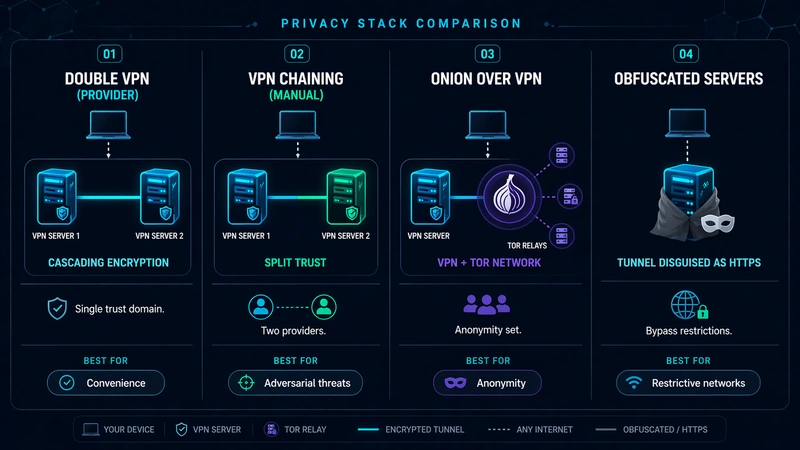
Multi-hop isn’t the only tool in the privacy stack, and confusing it with adjacent features is easy. Here’s how it sits against the neighbors:
| Tool | What it does | Trust model | Best for |
|---|---|---|---|
| Double VPN (provider) | Two servers, one provider, cascading encryption | Single trust domain | Everyday multi-hop privacy with convenience |
| VPN chaining (manual) | Two servers, two different providers | Split trust across providers | Adversarial threat models, journalists |
| Onion over VPN | VPN first, then Tor network | VPN + volunteer Tor relays | Anonymity-focused use cases |
| Obfuscated servers | Single tunnel disguised as regular HTTPS | Single trust domain | Restrictive networks (China, corporate) |
Double VPN vs manual VPN chaining
Provider-managed Double VPN is point-and-click. You pick a server pair in the app, it works. The trade-off: both hops are run by one company, meaning same privacy policy, same corporate jurisdiction, same potential point of failure.
Manual chaining means running two different VPN providers simultaneously. One VPN connects from your device, and the second VPN runs inside a virtual machine or on a router, so your traffic exits through both. This is actual split-trust. Provider A can’t compromise the chain without also getting provider B to cooperate. The setup is more involved, speed tends to be worse, and you’re paying two subscriptions. But for threat models where the adversary might pressure a single provider, this is the real deal, and the provider-managed version isn’t.
Double VPN vs Onion over VPN
Onion over VPN routes your traffic through a VPN first, then into the Tor network. The purpose is different from Double VPN. Tor provides anonymity through a network of volunteer relays (your traffic bounces through three of them before hitting the exit node). The weakness is that Tor exit nodes are public and sometimes monitored, and Tor is notably slower than VPN-only setups.
Onion over VPN fits when you want the anonymity properties of Tor but don’t want your ISP to see you connecting to a Tor entry node. Double VPN doesn’t offer Tor’s anonymity set; it offers jurisdictional separation and encryption layering. Different tools, different problems.
Double VPN vs obfuscated servers
Obfuscated servers solve a completely different problem: hiding the fact that you’re using a VPN at all. In restrictive networks that block VPN protocols (corporate firewalls, national-level filtering in some countries), obfuscation disguises VPN traffic as regular HTTPS so the filter doesn’t catch it. Double VPN doesn’t hide VPN usage. Anyone who can see your traffic still sees that you’re connecting to a VPN server. These features can sometimes be combined, but they’re solving different problems.
Who actually needs Double VPN, and who’s fine with a single tunnel?
Strong fit: adversarial threat models. Journalists communicating with sensitive sources, whistleblowers, activists in jurisdictions with aggressive state surveillance, researchers handling material that specific parties don’t want published. If your adversary might plausibly pressure a VPN provider, run correlation analysis on VPN traffic, or subpoena server logs in specific jurisdictions, the second hop adds real value. This is the population Double VPN was designed for.
Situational fit: heightened baseline privacy needs. Users in countries with mandatory ISP logging and long data retention periods. Privacy researchers testing specific scenarios. Users whose work involves handling data they’re contractually or ethically bound to protect at a level beyond what a single tunnel provides. For this group, Double VPN might be worth the trade-offs for sensitive sessions even if not for daily use.
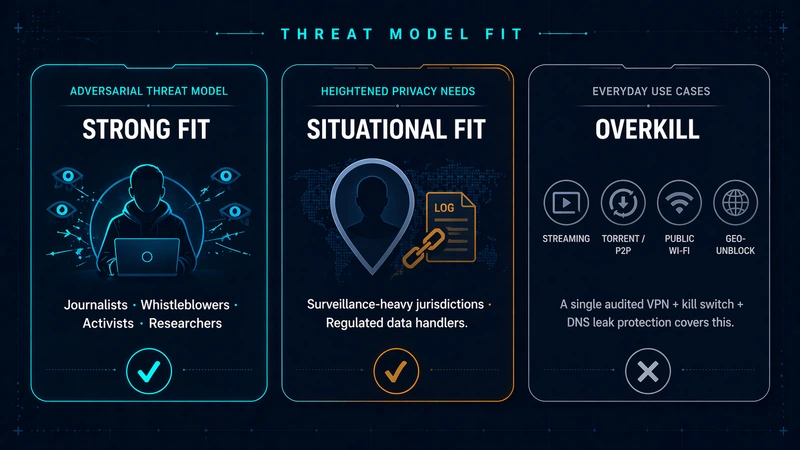
Overkill: most everyday use cases. Streaming, torrenting, dodging geo-blocks, protecting yourself on public Wi-Fi, keeping your ISP out of your browsing history. For all of these, a single well-audited VPN with solid fundamentals beats Double VPN in practical terms. What actually matters for this population is a VPN with a proper kill switch that cuts the connection if the tunnel drops, and DNS leak protection so requests don’t quietly escape. If you want the specifics, our pieces on what is a vpn kill switch and vpn dns leak protection cover what these features do and why they matter more than hop count for normal privacy.
If you can’t name the specific adversary Double VPN is protecting you from, you’re probably in the third group, and the speed cost isn’t buying you anything.
How do you set up Double VPN with NordVPN and other providers?
NordVPN’s Double VPN is one of the more visible implementations, which is why it comes up so often in searches. Here’s how it works and how it compares to what other providers offer.
NordVPN Double VPN. NordVPN offers a list of pre-configured server pairs with names like “US → Canada” or “Netherlands → Switzerland” that tell you the entry and exit countries. To enable it, open the location picker in the app, find “Specialty servers,” and select “Double VPN,” then pick one of the available pairs. Setup is four clicks. Historically, NordVPN’s Double VPN has been available on the OpenVPN protocol; WireGuard/NordLynx multi-hop support varies, so check the current app for what your chosen pair supports.
Once connected, the two-hop routing happens transparently. You browse normally.
Surfshark Multi-Hop. Same concept under a different name. Surfshark offers pre-configured multi-hop pairs, and in some app versions you can build your own pairs instead of picking from a fixed list.
ProtonVPN Secure Core. Proton’s version routes your traffic through a privacy-friendly country (Iceland, Sweden, Switzerland) before exiting to your chosen destination. The entry-country servers are owned and operated by Proton directly, which partially addresses the trust consolidation issue. You’re still trusting one company, but Proton has pushed infrastructure transparency further than most.
Mullvad bridge mode. Mullvad supports multi-hop through manual configuration rather than a one-click feature. More setup effort, more flexibility, same provider at both ends.
Perfect Privacy NeuroRouting. Automatic multi-hop routing across Perfect Privacy’s server network, with traffic to different destinations potentially taking different paths for added unpredictability.
The differences that matter when choosing: whether pairs are fixed or user-selectable, which protocols support multi-hop, and how much the provider has done to address trust consolidation.
How do you pick a VPN that’s trustworthy enough to rely on, with or without Double VPN?
A second hop doesn’t fix a dishonest provider. If the company at both ends of your Double VPN tunnel is keeping logs it shouldn’t or handing data over to whoever shows up with a letter, the extra encryption is decorative. Trust questions come first. Hop count comes later.
Why no-logs and audits matter more than hop count
Every VPN says “no logs.” That’s marketing. The meaningful signal is whether the claim has been independently verified by a reputable audit firm examining the infrastructure. Repeat audits beat one-off audits. Jurisdiction matters too: a provider headquartered in a country with no mandatory data retention laws and no cooperation treaty with surveillance alliances is a harder legal target. Some providers publish warrant canaries, signed statements that disappear if the provider has been compelled to cooperate with a subpoena. None of these signals is foolproof alone, but together they paint a clearer picture than any feature list.
A single-hop VPN from an audited provider with a verified no-logs record beats a Double VPN from a provider with unclear practices. Hop count is the last thing to optimize, not the first.
Features that quietly matter more than multi-hop for most people
A kill switch that reliably cuts your internet the moment the tunnel drops, not just a warning but a hard cut. DNS leak protection that’s on by default and works across IPv4 and IPv6. Protocol support for WireGuard alongside OpenVPN. RAM-only servers that can’t persist data across reboots by design. These features do more for the privacy of an average user than multi-hop ever will.
How to evaluate a provider’s anonymity claims
Look for specifics, not adjectives. “Complete anonymity” is a claim; “all servers run from RAM, wiped on reboot, and audited by Deloitte in 2024” is evidence. Our curated list of best anonymous vpn providers focuses on the ones that back their privacy claims with verifiable specifics rather than marketing language.
A shortlist worth comparing
You don’t need to audit the whole market yourself. A handful of providers consistently deliver on the trust signals that matter, and our VPN Select guide keeps a running comparison across those options, updated as providers change their practices.
Double VPN: quick answers to common questions
Is Double VPN worth the speed loss?
For most users, no. The speed cost is real, and the threats Double VPN uniquely addresses aren’t ones most people face. If your threat model includes state-level surveillance or correlation attacks against your VPN traffic, the trade-off flips. For everyday browsing, streaming, and general privacy, a single well-audited VPN covers more ground than a slow Double VPN from a weaker provider.
Is Double VPN safer than using Tor?
Different threat models. Tor gives you anonymity through a large network of volunteer relays, which is stronger for hiding who you are but weaker against traffic analysis at the exit node. Double VPN gives you jurisdictional separation and encryption layering but doesn’t offer Tor’s anonymity set. For anonymity from specific individuals or organizations, Tor (or Onion over VPN) is usually stronger. For avoiding correlation across two jurisdictions at reasonable speeds, Double VPN fits better.
Can you use Double VPN with streaming or gaming?
You can, but the speed and latency penalties make it a poor fit. Streaming services may work on some Double VPN pairs and not others depending on how aggressively the service blocks datacenter IPs. Gaming over multi-hop is almost always a bad idea. The added latency compounds across each hop, and real-time games are unforgiving about that.
Does Double VPN protect you if your VPN provider keeps logs?
Not really. If the provider at both ends is logging, they have the same visibility they’d have on a single-hop connection. They can see your real IP entering and your destination leaving, because they operate both servers. Double VPN from a single provider doesn’t split trust; it only splits what each individual server sees. If you need genuine split-trust, you need two different providers in a manual chain.
How is NordVPN’s Double VPN different from other providers’ multi-hop?
Most of the meaningful differences are practical rather than structural. NordVPN offers pre-configured pairs with one-click activation. ProtonVPN’s Secure Core uses entry servers in privacy-friendly countries that the company owns outright. Surfshark lets you build your own hop pair in some app versions. Mullvad requires manual configuration. The underlying technique (cascading encryption across two servers) is similar everywhere. What varies is flexibility, protocol support, and how much the provider has done to address trust consolidation.



Leave a comment