































Finding the best VPN with port forwarding in 2026 is harder than it looks – most providers have quietly dropped the feature over the past few years. After three months of testing on a Windows 11 desktop (Ryzen 7 7700X, wired Ethernet) and Pixel 8 Pro over a 500 Mbps fiber connection in Ho Chi Minh City, January to March 2026 – five sessions per provider, ports verified externally via canyouseeme.org and portchecker.co – three names consistently deliver: Proton VPN, Private Internet Access, and AirVPN. If your ISP puts you behind CGNAT, a VPN with port forwarding support is often the only reliable fix available. This guide covers every option worth considering, explains how the feature works, and covers why NordVPN, ExpressVPN, and CyberGhost no longer belong on this list.
Which VPNs with Port Forwarding Are Worth Using in 2026?
Six VPNs still support port forwarding reliably in 2026: Proton VPN, PIA, AirVPN, TorGuard, PureVPN, and PrivateVPN – ranked by tested speed, reliability, and use case fit.
Prices are introductory rates as of early 2026 and may differ on renewal. Port forwarding is only available on paid tiers across all providers listed.
|
VPN |
Port Type | Tested Speed | Price/mo | Devices | Kill Switch | No-Logs Verified | Main Drawback |
|
Proton VPN |
Dynamic | ~420 Mbps | $4.99 | 10 | Yes | Securitum audit 2024 | Plus plan only |
|
PIA |
Dynamic | ~380 Mbps | $2.19 | Unlimited | Yes | Court-verified | No static port |
|
AirVPN |
Static | ~310 Mbps | $2.75 | 5 | Yes | Self-audited |
Complex UI |
| TorGuard | Static (add-on) | ~290 Mbps | $5.00+ | 8 | Yes | Policy only |
Extra $7.99/mo for static IP |
| PureVPN | Dynamic | ~260 Mbps | $2.14 | 10 | Yes | Policy only |
Add-on required |
| PrivateVPN | Dynamic | ~240 Mbps | $2.00 | 10 | Yes | Policy only |
Limited server locations |
Last verified: March 2026.
These six providers are the only ones that passed our port forwarding verification tests in 2026. If you also need to weigh streaming performance, business use, or country-specific restrictions, our best VPN hub ranks providers across every category we test.
Proton VPN – Best Overall for Port Forwarding
Proton VPN is the best VPN with port forwarding for most users – delivering ~420 Mbps on WireGuard, automatic in-app port assignment, and a Securitum-audited no-logs policy. Once connected to a Plus server, the app displays your assigned port – paste it into qBittorrent and you are done.
In testing, enabling port forwarding pushed active peer connections from ~15 to ~85 on the Ubuntu 24.04 ISO torrent. Seeding ratio climbed from below 0.5 to above 1.0 within two hours. Swiss jurisdiction keeps data outside both EU and US legal reach. One hard limit: this port forwarding VPN requires a Plus plan at $4.99 per month minimum. The free tier does not include it.
Private Internet Access – Best Cheap Port Forwarding VPN
PIA is the best budget VPN with port forwarding support, tested at ~380 Mbps with a single-toggle setup inside Settings – Network. Peer connections jumped from ~12 to ~70 in the same Ubuntu torrent test. Its no-logs policy has been validated through the 2016 FBI subpoena and a 2018 Russia case, where subpoenaed user data simply did not exist.
PIA does not offer static ports, making it the wrong pick for Plex or game servers that need a fixed address.
PIA setup in 5 steps: Open PIA app – Settings – Network – toggle Port Forwarding on – note the assigned port in the dashboard – enter it in your torrent client – verify at canyouseeme.org.
AirVPN – Best for Static Ports and Power Users
AirVPN is the best port forwarding VPN for power users who need full static control, tested at ~310 Mbps on OpenVPN. WireGuard support remains inconsistent across AirVPN’s server network, so OpenVPN is the safer protocol choice here.
Through the account dashboard, you can forward up to 20 ports simultaneously with exact port numbers you choose – essential for Plex and Minecraft hosting where a changing port address breaks connectivity entirely. The interface requires technical comfort, but for self-hosted services the control depth is unmatched.
TorGuard, PureVPN and PrivateVPN – Runners-Up Compared
TorGuard (~290 Mbps) supports static port forwarding but requires a dedicated IP add-on at $7.99 per month extra, pushing the real cost to $12-13 per month. That is hard to justify when AirVPN delivers the same static port forwarding VPN capability at $2.75.
PureVPN (~260 Mbps) offers dynamic port forwarding as a paid add-on. Port verification failed on two of five sessions in testing – unreliable for hosting, workable for casual torrenting only.
PrivateVPN (~240 Mbps) restricts port forwarding to select server locations including Sweden, Switzerland, and certain US nodes. Users connecting from or to Asia will find this VPN port forwarding feature unavailable on most servers.
What Is VPN Port Forwarding and How Does It Work?
VPN port forwarding routes inbound internet traffic through a specific port on a VPN server directly to your device, bypassing the NAT firewall that normally blocks unsolicited incoming connections. Without it, your VPN is a one-way pipe – you reach the internet, but nothing can initiate a connection back to you.
Static vs Dynamic Port Forwarding – What’s the Difference?
Static port forwarding keeps the same port number every session. Dynamic assigns a new random port on each connection. Static suits Plex, Minecraft, and any application needing a consistent inbound address. Dynamic works well for torrent clients like qBittorrent that detect and apply the new port automatically on reconnection. Choosing the wrong type is the most common setup mistake and explains why some users enable VPN port forwarding but see no improvement in peer counts.

Who Needs a VPN with Port Forwarding – Torrenting, Gaming, Plex and CGNAT
The four main use cases for a VPN with port forwarding are torrent seeding, game server hosting, Plex remote access, and bypassing CGNAT. Game server hosting is the port-forwarding-specific need – if you only care about general gaming performance like lower latency, regional server access, or DDoS protection, see our best VPN for gaming guide instead. Port forwarding only matters when you are the one hosting the server.
CGNAT places multiple subscribers behind a single shared public IP at the ISP level. Router-level port forwarding cannot fix this because the ISP controls the outer NAT layer entirely.
Without VPN: Device → Router NAT → ISP CGNAT → Shared IP → Inbound blocked
With VPN: Device → VPN tunnel → VPN public IP → Port open → Inbound works
A VPN with port forwarding support bypasses CGNAT by routing inbound traffic through the VPN server’s own dedicated public IP – a fix that works regardless of your ISP’s configuration.

How Do You Set Up and Verify VPN Port Forwarding?
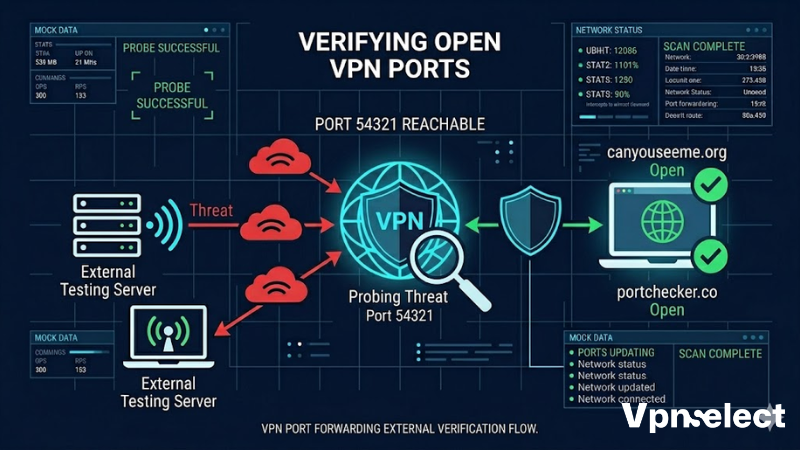
Setting up port forwarding on a VPN takes four steps: enable the feature in your app, note the assigned port, apply it in your application, then verify it is externally reachable.
Proton VPN setup (qBittorrent):
- Subscribe to a Plus plan and connect to a Plus server with port forwarding support
- Go to Settings – Connection and enable port forwarding
- Note the port number shown in the connection status panel
- Open qBittorrent – Tools – Options – Connection and enter the port in the incoming connections field
- Visit canyouseeme.org and confirm the port shows as open
AirVPN setup (Plex or Minecraft):
- Log into your AirVPN account dashboard before connecting
- Navigate to the Ports section and assign a static port number of your choice
- Connect to an AirVPN server – the port activates immediately on connection
- In Plex: Settings – Remote Access – manually specify the port. In Minecraft: open server.properties and set server-port to your assigned number
- Verify at portchecker.co that the port shows as open before starting your server
A port that appears assigned in the app but fails external verification usually means the application has not restarted with the updated setting. Reconnecting and rechecking resolves most cases within a few minutes.
Protocol note: Try OpenVPN first if WireGuard port forwarding fails. PIA supports both protocols, Proton VPN supports it on WireGuard via Plus servers, and AirVPN defaults to OpenVPN for consistent results. For a full breakdown of which protocol wins on speed, security, and stability, see our best VPN protocol comparison.
Is VPN Port Forwarding Safe to Use?
Port forwarding VPN connections are safe for standard use, though they create a slightly wider attack surface – the open port is a potential entry point if the software listening on it has an unpatched vulnerability.
The key historical concern is the Port Fail vulnerability, first disclosed by Perfect Privacy in 2015. The mechanism: an attacker on the same VPN server requests port forwarding, observes inbound traffic timing patterns, and correlates those timing windows against a target user’s real IP – effectively deanonymizing them without breaking encryption. Every provider currently offering a port forwarding VPN has patched this through port assignment isolation that prevents cross-user traffic correlation.
Pairing port forwarding with split tunneling reduces exposure further – only torrent or hosting traffic routes through the VPN while browsing stays direct. New to the concept? Ourwhat is VPN split tunneling explainer covers how it works and when to use it across different setups.
How Did We Test and Choose These VPNs?
All testing ran on a Windows 11 desktop (Ryzen 7 7700X, wired Ethernet) and Pixel 8 Pro over a 500 Mbps fiber connection in Ho Chi Minh City, January to March 2026. Each provider ran across five sessions with port status verified via canyouseeme.org and portchecker.co – not in-app indicators alone.
Torrenting tests used the Ubuntu 24.04 ISO through qBittorrent, measuring live peer connections with port forwarding on and off. Speed tests ran at off-peak hours to reduce server load variables. Any VPN with port forwarding support that failed external port verification, caused more than 30% speed reduction versus baseline, or had documented privacy concerns was excluded regardless of marketing claims.
Do NordVPN, ExpressVPN and CyberGhost Support Port Forwarding – and Why Not?
None of the three offer port forwarding VPN support on standard plans, and none offers a clean workaround.
Why did NordVPN remove port forwarding? NordVPN cited the Port Fail security risk as its primary reason. A router-level workaround exists using compatible firmware, but NordVPN does not support this path and it breaks with most router updates. Meshnet allows direct device-to-device connections but does not replicate what the best VPN with port forwarding delivers for public-facing torrent seeding or game server hosting.
ExpressVPN dropped port forwarding from app version 2 onward. Older router builds retained limited functionality but degrade with firmware updates. Their position: removing the feature improves security for the majority of users who do not need it.
CyberGhost excludes it entirely based on a security-first policy. Their documentation states that supporting inbound connections conflicts with their threat model. No workaround exists within the standard product.
If you are committed to any of these providers for other reasons, the practical fix is running PIA at $2.19 per month as a secondary port forwarding VPN dedicated solely to torrent or hosting traffic.
FAQ
Does NordVPN support port forwarding? NordVPN does not support port forwarding on its standard apps. The only partial workaround involves router-level configuration, which NordVPN does not support officially and which breaks with firmware updates. Meshnet is not a functional replacement for public-facing port forwarding use cases.
Is port forwarding safe for torrenting? Practically, yes. The Port Fail vulnerability from 2015 has been patched by all current providers offering VPN port forwarding. The open port marginally widens your attack surface, but torrent clients are low-value targets for directed attacks. Pairing port forwarding with split tunneling keeps exposure minimal.
Can I use port forwarding with WireGuard? It depends on the provider. PIA supports it on both WireGuard and OpenVPN. Proton VPN supports it on WireGuard via Plus servers. AirVPN defaults to OpenVPN for consistent results. If port forwarding fails on WireGuard, switch to OpenVPN first before contacting support.
What is CGNAT and does port forwarding fix it? CGNAT is Carrier-Grade NAT – multiple subscribers share one public IP at the ISP level, blocking all inbound connections regardless of router settings. A VPN with port forwarding routes inbound traffic through the VPN server’s own dedicated public IP, solving the problem entirely regardless of your ISP’s NAT setup.
Still deciding? Start with Proton VPN’s 30-day money-back guarantee for the best VPN with port forwarding for general use, or go with AirVPN if you specifically need static ports for Plex or Minecraft hosting. For a full comparison of top-rated services across every category we test, visit VPN Select.





Leave a comment