






























What Is a VPN and How Does It Work?
What is a VPN? A VPN – Virtual Private Network – is a privacy tool that encrypts your internet traffic and hides your IP address by routing your connection through a secure remote server. Whether you’re securing data on public Wi-Fi, bypassing geo-blocked content, or simply keeping your browsing activity private, a VPN is one of the most practical tools available today. This guide covers how VPNs work technically, what privacy protections they actually offer, which features to look for in a provider, and which advanced options are worth understanding before you commit.
What Is a VPN and How Does It Work?
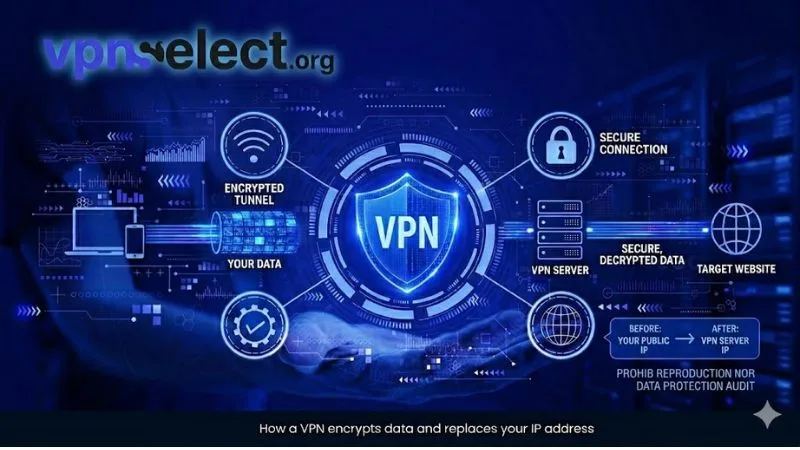
What is a VPN, in technical terms? It is a networking tool that creates an encrypted tunnel between your device and a remote server, masking your identity and securing all data in transit. To understand its full value, it helps to look at two core mechanisms: encryption and IP masking.
How Does a VPN Encrypt Your Data?
When you activate a VPN, your device negotiates an encrypted connection with the VPN server before any data is sent. This process uses symmetric encryption – most commonly AES-256 – to convert your readable traffic into an unreadable cipher that only the VPN server can decode.
Every packet you send, whether a login credential, a search query, or a file upload, passes through this encrypted tunnel. Without it, anyone on the same network – your ISP, a hacker, or a surveillance system – can potentially intercept and read your traffic. With a what is a VPN connection active, even intercepted data appears as scrambled text with no usable information.
The encryption process also includes a handshake protocol that authenticates both endpoints, ensuring you’re connecting to a legitimate server and not a malicious impersonator.
What Happens to Your IP Address When You Use a VPN?
Your IP address is replaced with the IP of the VPN server you connect to. Websites, ad networks, and tracking scripts see only that server’s IP – not your real location or identity.
This IP substitution is what enables a VPN to make you appear as if you’re browsing from a different country. It’s the foundation of geo-restriction bypass and a significant layer of protection against online tracking. Your real IP remains hidden for as long as the VPN connection stays active.

How Does a VPN Protect Your Privacy?
What is a VPN doing for your privacy? It protects you by encrypting your traffic, replacing your IP address, and preventing third parties from monitoring your online behavior – three mechanisms that together create a meaningful, though not absolute, privacy layer.
Does a VPN Protect You on Public Wi-Fi?
Yes – protecting users on public Wi-Fi is one of the most critical use cases for a VPN. Open networks at airports, hotels, and cafes lack encryption by default, making them vulnerable to man-in-the-middle attacks where a bad actor intercepts unencrypted traffic.
When you connect to a VPN before joining a public hotspot, all outgoing data is encrypted at the device level. Even if an attacker captures your packets on that network, they cannot read the content. This is especially important when accessing email, banking apps, or any service that requires a password or sensitive input.
Can a VPN Bypass Geo-Restrictions and Censorship?
Yes – a VPN can bypass geo-restrictions and censorship by routing your connection through a server in a permitted country, making your traffic appear to originate there.
Streaming platforms limit content libraries by region. By connecting to a VPN server in a target country, you can access content that would otherwise be unavailable in your location. In countries with heavy censorship, a VPN similarly allows access to blocked websites and services. That said, not all VPNs succeed here – some platforms actively detect and block VPN traffic, which is why obfuscation (covered in the final section) becomes relevant for persistent access.
What Should You Look for in a VPN Provider?
Choosing the right what is a vpn provider comes down to four criteria: security architecture, protocol quality, pricing transparency, and honest privacy claims. Each factor affects how much real protection you actually get.
Here is a comparison of key criteria across provider types to help you evaluate your options. The table below summarizes how what is a VPN providers differ across the most important decision points.
| Criteria | Free VPN | Budget Paid VPN | Premium Paid VPN |
| No-logs policy | Rarely audited | Sometimes | Usually third-party audited |
| Kill switch | Often missing | Available | Standard |
| Protocol options | Limited | Moderate | WireGuard, OpenVPN, IKEv2 |
| Obfuscation | Rare | Uncommon | Available on top providers |
| Data limits | Yes | No | No |
What Is a VPN Kill Switch and Why Does It Matter?
A kill switch is a feature that automatically cuts your internet connection the moment your VPN drops unexpectedly. Without it, your real IP and unencrypted traffic become briefly visible every time the VPN disconnects – even for a fraction of a second.
For most users, this lapse might feel trivial. But for journalists, activists, or anyone handling sensitive information, even a momentary exposure can be consequential. A reliable what is a VPN provider should include a kill switch as a default feature, not an optional add-on or premium upgrade.
Which VPN Protocols Are the Most Secure?
The three most secure and widely used VPN protocols are WireGuard, OpenVPN, and IKEv2/IPSec. Each offers a distinct balance:
WireGuard is the most modern, with a lean codebase that’s easier to audit and fast enough for everyday use. OpenVPN is battle-tested, highly configurable, and the go-to choice for security-focused environments. IKEv2/IPSec handles mobile connections particularly well due to its ability to reconnect quickly when switching between Wi-Fi and cellular networks.
Older protocols like PPTP should be avoided – they carry known vulnerabilities and are no longer considered secure.
Free VPN vs Paid VPN: Which Should You Use?
Free VPNs are tempting, but they routinely monetize users through data logging and targeted advertising – the exact behavior a VPN is designed to prevent. They also typically impose data caps, offer fewer servers, and provide slower speeds.
Paid VPNs, particularly those with independently audited no-logs policies, deliver meaningfully better protection. For anyone serious about privacy, a paid subscription is the right choice. You can explore verified options at Best VPN to compare providers based on audit results, protocol support, and independent performance testing.
Does a VPN Make You Completely Anonymous?
No – a VPN significantly improves privacy, but it does not make you completely anonymous. Your VPN provider itself can technically observe your traffic. If they log activity and are compelled by law to disclose it, your data is exposed.
Beyond the provider, browser fingerprinting, persistent cookies, and logged-in accounts can still identify you regardless of what is a VPN doing to your IP. True anonymity requires layering additional tools – hardened browsers, tracker blockers, and behavioral discipline online. Think of a VPN as a strong first layer, not a complete solution.
Advanced VPN Features Worth Knowing
Beyond core encryption and IP masking, what is a VPN capable of at a more advanced level? Three features – split tunneling, multi-hop routing, and obfuscation – each solve a distinct problem and are worth understanding before selecting a provider.
What Is Split Tunneling in a VPN?
What is a VPN split tunneling? It is a feature that lets you selectively route traffic – choosing which apps or destinations go through the VPN tunnel and which connect directly to the internet.
For example, you might route your browser through the VPN for privacy while letting your video streaming app connect directly for better speed. This is particularly useful when VPN overhead is noticeable, or when you need simultaneous access to local network devices like a printer or NAS drive. Not all providers implement split tunneling equally well – look for per-app control rather than just domain-level exclusions for maximum flexibility.
What Is a Double VPN (Multi-Hop)?
A Double VPN, also called multi-hop, chains two VPN servers in sequence. Your traffic is encrypted twice and your IP passes through two separate relay points before reaching the internet, making it significantly harder to trace back to the source.
This feature is designed for high-risk users – journalists, whistleblowers, political dissidents – where an extra layer of routing justifies the trade-off in speed. Double encryption and two-hop routing introduce noticeable latency, so it’s not practical for casual browsing. Use it selectively when security requirements outweigh performance.
What Is VPN Obfuscation and When Do You Need It?
VPN obfuscation disguises encrypted VPN traffic to look like standard HTTPS traffic, bypassing detection systems that identify and block VPN connections based on traffic signatures.
Standard VPN protocols have a recognizable packet structure. Deep packet inspection (DPI) tools used by censorship systems or corporate networks can detect and block this traffic. Obfuscation strips or scrambles the VPN header so the connection appears indistinguishable from normal web browsing. If you’re in a country that restricts VPN usage, or on a network that blocks VPN ports, obfuscation is the feature that keeps your connection alive. Check a trusted VPN Guide to identify which providers include this capability by default.
📷 Image suggestion: Side-by-side comparison of standard VPN packet vs. obfuscated VPN packet flowAlt text: VPN obfuscation hiding traffic from deep packet inspection
Wrapping Up
Understanding what is a VPN means going beyond the surface definition. From AES-256 encryption and IP masking, to public Wi-Fi protection, geo-restriction bypass, kill switches, protocol selection, and advanced features like split tunneling, multi-hop, and obfuscation – a well-chosen VPN is one of the most versatile privacy tools you can use.
The key points to carry forward: prioritize providers with audited no-logs policies, always check for a kill switch, choose protocols like WireGuard or OpenVPN, and be realistic about what a VPN can and cannot guarantee about your anonymity.
Ready to find the right fit? Visit VPN Select to explore in-depth comparisons, learn how does a vpn work in more detail, and discover best free vpns worth considering – all curated to help you make a confident, well-informed decision.


Leave a comment