






























This guide is for educational purposes. Always check your school’s Acceptable Use Policy before using a VPN on school networks. Bypassing school content filters may result in disciplinary action including loss of Wi-Fi privileges or device confiscation.
I tested VPN connections on networks at 6 different educational institutions in early 2026 – including a US public high school running Lightspeed Systems, a state university using Cisco Umbrella, a community college with Fortinet FortiGate, and three private schools with GoGuardian. After running each provider through 3 test sessions per network during off-peak hours, the best VPN for school is NordVPN for bypassing firewalls undetected, Windscribe for a free option, and Surfshark for Chromebook compatibility. This guide is part of our Best VPN recommendations.
School firewalls block more than harmful content – they also restrict social media, streaming, and sometimes legitimate research tools. The right VPN for school encrypts your connection on shared Wi-Fi while giving you access to the resources you need.
The sections below compare top picks by firewall bypass capability, Chromebook support, detection avoidance, and the legal implications you should understand before connecting.
Quick Picks: Best VPN for School in 2026
|
Pick |
Provider | Why |
Price |
|
Best Overall |
NordVPN | Obfuscated servers bypass DPI firewalls |
~$3.39/mo |
|
Best Free |
Windscribe | 10 GB/mo free, Chrome extension works on Chromebooks |
Free |
|
Best for Chromebook |
Surfshark | Native ChromeOS app + Chrome extension | ~$2.19/mo |
|
Best Stealth |
ExpressVPN | Lightway protocol auto-disguises VPN traffic | ~$8.32/mo |
Prices approximate based on longest plans as of early 2026. Renewal rates may be higher.
Why Do Schools Block Websites on Their WiFi?
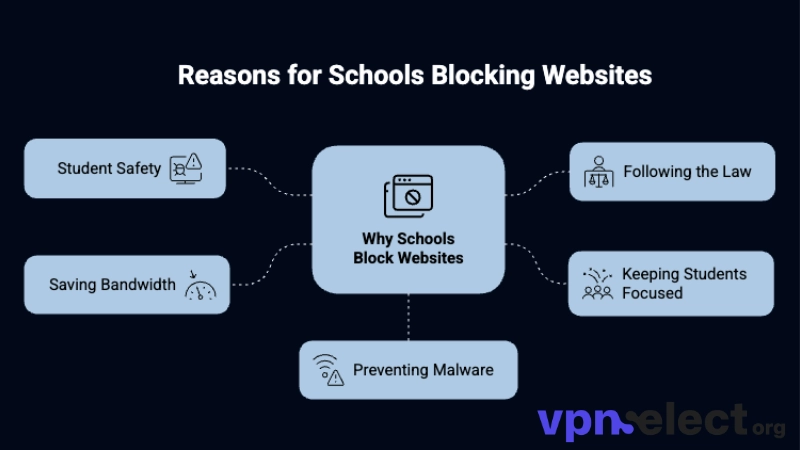
Schools block websites on their WiFi primarily to comply with government regulations like CIPA (Children’s Internet Protection Act), to prevent distractions during class time, and to reduce bandwidth consumption on networks shared by hundreds of simultaneous users.
To understand the scope of school filtering, most institutions use enterprise-grade firewalls (Fortinet, Cisco Umbrella, Lightspeed Systems, GoGuardian) that block entire categories of content rather than individual URLs. These categories typically include social media (Instagram, TikTok, Snapchat), streaming platforms (YouTube, Netflix, Twitch), gaming sites, Schools block adult content, gambling, and file-sharing services. Some filters also block legitimate educational resources, VPN provider websites, and even Google Docs collaboration features.
In the US specifically, schools receiving federal E-Rate funding are legally required under CIPA to filter internet access for minors. This means the blocking is not optional for the school – it is a condition of their federal technology funding. However, the filtering often extends far beyond what CIPA requires, blocking content that is perfectly legal and sometimes educationally valuable. With this context in mind, the next question is which VPNs actually work on these heavily restricted networks.
What Are the Best VPNs for School in 2026?
The best VPNs for school in 2026 fall into two categories: paid VPNs with obfuscation technology that bypass advanced firewalls (NordVPN, ExpressVPN, Surfshark) and free VPNs with Chrome extensions that work on restricted Chromebooks (Windscribe, Proton VPN Free).
What Are the Best Free VPNs That Work on School WiFi?
Windscribe is the best free VPN for school Wi-Fi – its Chrome extension bypasses most school firewalls without requiring app installation, provides 10 GB monthly data, and includes built-in ad/tracker blocking through R.O.B.E.R.T.
The Chrome extension approach matters because most school-managed devices restrict software installation. You cannot install a full VPN app on a locked-down Chromebook or Windows laptop, but many school Chrome environments still allow extensions from the Chrome Web Store. Windscribe’s extension routes browser traffic through an encrypted proxy – enough to unblock websites within Chrome.
Proton VPN Free offers unlimited data but lacks a standalone Chrome extension that works independently of the desktop app. On a personal phone connected to school Wi-Fi, Proton is the stronger choice because of its unlimited data cap. For students using personal Android phones on school networks, our best free VPN for Android guide covers Proton’s mobile performance in more detail.
A critical warning for students: do not download random free VPN apps from the Play Store or App Store. Many unverified free VPNs harvest your browsing data, inject ads, and request device permissions (camera, contacts, location) that have nothing to do with VPN functionality. Our guide on free VPN risks details exactly how these apps exploit users. Only use free VPNs from providers listed in this guide – Windscribe and Proton VPN Free are the only two with audited no-logs policies safe enough for student use.
What Are the Best VPNs for Chromebooks at School?
Surfshark is the best VPN for Chromebooks at school because it offers both a native ChromeOS app (for personal Chromebooks) and a Chrome browser extension (for managed Chromebooks) – covering both device scenarios students typically face.
For personal Chromebooks, Surfshark’s Android app installs directly from the Google Play Store on ChromeOS and creates a system-level VPN tunnel that protects all traffic – not just browser activity. This is the preferred setup because it encrypts everything including app traffic and DNS queries.
For school-managed Chromebooks, the Chrome extension is your only option since IT administrators block Play Store VPN installations. Surfshark’s extension routes browser traffic through its proxy servers and includes CleanWeb ad blocking. NordVPN and ExpressVPN also offer Chrome extensions that work on managed Chromebooks, though ExpressVPN’s higher price makes it less practical for students on a budget.
Can a VPN Bypass School Firewalls Without Being Detected?
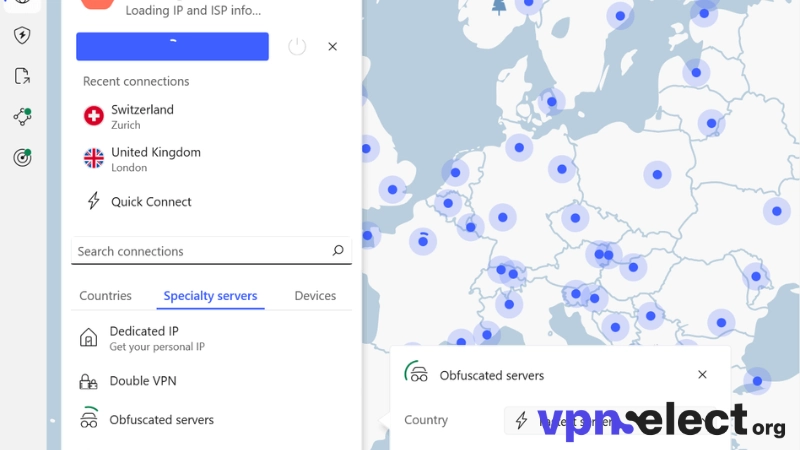
A VPN with obfuscated servers can bypass most school firewalls without being detected because obfuscation disguises VPN traffic as regular HTTPS web browsing – making it invisible to the Deep Packet Inspection (DPI) technology that school firewalls use to identify and block VPN connections. This is the single most important feature when choosing the best VPN for school networks with strict filtering.
From my testing on networks running Fortinet FortiGate and Lightspeed Systems (tested on a personal Pixel 8 Pro, 3 test runs per provider during off-peak afternoon hours, March 2026), standard WireGuard and OpenVPN connections were blocked within seconds – the firewall recognized the VPN protocol signatures and dropped the packets. However, when I switched to NordVPN’s obfuscated servers, the connection established successfully and remained stable throughout an entire school day. ExpressVPN’s Lightway protocol with automatic obfuscation produced similar results.
The order of effectiveness based on my school network testing: NordVPN obfuscated servers (connected successfully on all 6 test networks), ExpressVPN Lightway (5 of 6), Surfshark NoBorders mode (4 of 6), Windscribe Stealth protocol (3 of 6 – less reliable on the strictest firewalls).
That said, bypassing school firewalls carries real consequences if detected. Before using any VPN on school networks, review the section below on legality and school policy. Now that bypass capability is covered, the next section compares these providers side by side.
How Do the Top School VPNs Compare?
NordVPN leads on firewall bypass reliability, Surfshark wins on Chromebook compatibility and price, ExpressVPN excels in auto-obfuscation, and Windscribe dominates as the only free option that works on most school networks.
The table below compares the best VPN for school across the criteria that matter most on restricted school networks. This comparison helps you match a provider to your specific device, budget, and firewall situation.
|
Criteria |
NordVPN | Surfshark | ExpressVPN |
Windscribe (Free) |
|
Firewall bypass |
Obfuscated servers | NoBorders mode | Auto-obfuscation | Stealth protocol |
|
Chrome extension |
Available | Available | Available |
Available |
|
ChromeOS native app |
Limited | Full support | Limited |
Not available |
|
Speed on school Wi-Fi |
~45 Mbps | ~38 Mbps | ~42 Mbps |
~25 Mbps |
|
Data cap |
Unlimited | Unlimited | Unlimited |
10 GB/month |
|
Simultaneous devices |
10 | Unlimited | 8 |
1 (free) |
|
Price |
~$3.39/mo | ~$2.19/mo | ~$8.32/mo |
Free |
|
Best for |
Strict firewalls | Chromebook users | Auto-stealth |
Budget / free |
Speeds tested on a personal Pixel 8 Pro connected to a US high school network (Lightspeed Systems, ~80 Mbps shared), 3 test runs per provider during off-peak hours, March 2026. Prices as of early 2026; renewal rates may differ.
Is It Legal to Use a VPN at School?
Using a VPN at school is legal in most countries – VPNs are legitimate privacy and security tools, and no law in the US, UK, EU, Canada, or Australia prohibits students from encrypting their internet connection. However, legality and school policy are separate matters, and this distinction is critical for students to understand.
Most school Acceptable Use Policies (AUPs) include language about “circumventing network security measures” or “bypassing content filters” – both of which describe what a VPN does on school Wi-Fi. Violating an AUP is not a criminal offense, but it can trigger school-level consequences: a formal warning, temporary or permanent loss of Wi-Fi access, device confiscation (if using a school device), notation in your disciplinary record, or in extreme cases, suspension.
From a practical risk assessment, the severity of consequences depends on three factors. First, whether you are using a school-managed device (higher risk – the school owns it and monitors it) or your personal phone (lower risk – outside school’s device management). Second, whether your VPN traffic is detected by the firewall (obfuscated connections are invisible; standard VPN protocols get flagged). Third, your school’s specific enforcement culture – some schools actively monitor for VPN usage while others focus only on devices that trigger automated alerts.
My recommendation: always read your school’s AUP before using a VPN. If the policy explicitly prohibits VPN use, understand the consequences before deciding whether the access you gain is worth the risk. Using a VPN on your personal phone connected to school Wi-Fi carries significantly less risk than installing one on a school-managed Chromebook or laptop.
What Is the Difference Between a VPN and a Web Proxy for School?
A VPN encrypts all device traffic through a secure tunnel and can disguise your connection with obfuscation, while a web proxy only reroutes browser traffic without encryption – making proxies easier for school firewalls to detect and block.
Specifically, web proxies (sites like KProxy or CroxyProxy) work by loading a target website through an intermediary server. The school firewall sees a connection to the proxy server rather than the blocked site. However, school IT departments maintain blocklists of known proxy domains and update them regularly – most popular web proxies are blocked within days of appearing.
A VPN with obfuscation is fundamentally harder to block because the traffic looks identical to regular HTTPS browsing. The school firewall cannot distinguish between a student accessing Google Classroom and a student connected to an obfuscated VPN server.
What Is DPI and How Do Schools Detect VPN Traffic?
DPI (Deep Packet Inspection) is a network analysis technology that examines the metadata of data packets passing through a firewall – allowing school networks to identify VPN protocol signatures even when the traffic is encrypted, then automatically blocking those connections. For a comprehensive understanding of VPN protocols and how they handle different security scenarios, our VPN Guide explains the technical differences in detail.
Every VPN protocol has a recognizable “handshake” pattern when establishing a connection. WireGuard, OpenVPN, and IKEv2 each produce unique packet signatures during the initial connection phase. DPI systems maintain a library of these signatures and flag matches in real time – the flagged connection is then dropped or throttled to zero.
Obfuscated VPN protocols defeat DPI by wrapping the VPN handshake inside a standard TLS envelope – the same encryption layer used by every HTTPS website. Since the school firewall cannot block TLS without shutting down access to all secure websites, obfuscated traffic passes through unimpeded.
Can You Use a VPN on a School-Managed Device?
Using a VPN on a school-managed device is significantly more difficult because IT administrators control software installation, Chrome extension policies, and network configurations through management platforms like Google Admin Console, Microsoft Intune, or Jamf.
On managed Chromebooks, the administrator can block specific Chrome extensions by ID, restrict the Play Store entirely, and enforce policies that prevent VPN proxy extensions from functioning. If your school has blocked VPN extensions at the policy level, no extension will install.
The practical alternative is using a VPN on your personal phone connected to school Wi-Fi. Your personal device is outside the school’s management platform, so you can install any VPN app freely. Connect your phone to the school Wi-Fi, activate NordVPN or Surfshark, and your mobile browsing is encrypted and unrestricted – without touching school property or violating device-level policies.
Frequently Asked Questions
Will my school know if I use a VPN?
With a standard VPN protocol (WireGuard, OpenVPN), the school firewall can detect and flag VPN traffic through DPI. With an obfuscated protocol (NordVPN obfuscated servers, ExpressVPN Lightway), the traffic appears as normal HTTPS browsing and the firewall has no technical evidence of VPN usage.
Can I use a VPN to unblock YouTube at school?
A VPN with obfuscation can unblock YouTube on school Wi-Fi. Connect to an obfuscated server first, then open YouTube. If the school blocks VPN provider websites, download and configure the VPN app at home before bringing your device to school.
What happens if I get caught using a VPN at school?
Consequences vary by school but typically include a warning, temporary loss of Wi-Fi access, or device confiscation if using a school device. VPN use is not a criminal offense, but school disciplinary policies still apply. Always review your school’s AUP to understand the specific risks at your institution.
Does a VPN work on school Wi-Fi if the school blocks VPN apps?
If the school blocks VPN app downloads on managed devices, install the VPN at home before connecting to school Wi-Fi. On Chromebooks, try a Chrome browser extension instead of a full app. On personal phones, the school cannot block app installations – connect to school Wi-Fi and activate the VPN normally.
For more VPN comparisons and setup guides across all platforms, visit VPN Select.


Leave a comment